Showing posts with label Web Design. Show all posts

How Accessible Bank Websites Can Make Digital Banking Feel Clearer

accessible bank websites digital banking cleaner experience

Table of Contents

  1. Why Clarity Matters on Bank Websites
  2. How Design Supports Trust and Transparency
  3. Accessibility Basics Every Banking Site Should Cover
  4. Building Navigation Around Real Customer Tasks
  5. Making Key Banking Journeys Work on Small Screens
  6. Designing Better Forms, Logins, and Error Messages
  7. Connecting Digital Tools With Human Support
  8. Testing the Experience Before and After Launch
  9. A Practical 2026 Website Checklist
  10. Conclusion

Digital banking should help people make confident decisions, whether they are comparing accounts, checking a rate, applying for credit, or trying to reach support. Effective bank website design is not about adding more visual effects. It is about removing uncertainty at every important step. For banks, credit unions, and financial service providers, a clear website is part of the customer experience, not simply a marketing channel. When information is easy to understand, actions are clear to find, and support is available when needed, visitors can move forward without feeling rushed or confused.

Why Clarity Matters on Bank Websites

A banking website exists to help visitors complete tasks, not make them decode internal product categories. People may arrive to compare checking accounts, find fees, locate a branch, start an application, or sign in securely. Each path should be obvious from the first screen. Consider a visitor looking for the monthly fee on a savings account. If that detail is hidden behind promotional copy, a comparison tool, and several unclear links, the visitor may leave rather than continue. Clear labels, focused pages, and visible next steps make the experience feel more dependable.

How Design Supports Trust and Transparency

Visual polish can create a positive first impression, but it cannot replace useful information. Trust grows when a site uses plain language, clearly displays current rates and terms, provides accurate contact options, and explains security practices without jargon. Spacing, readable type, and restrained color choices also matter because financial information is often dense. Customers should be able to scan a page and quickly identify eligibility requirements, fees, deadlines, and important conditions. The best pages answer difficult questions before a customer asks them.

Accessibility Basics Every Banking Site Should Cover

Accessibility is a service standard, not a final compliance check. The principles of web accessibility support people who use screen readers, keyboards, text enlargement, voice controls, and other assistive technologies, while also improving usability for people on slow connections or small screens.

Build for different ways of using the web

  • Use sufficient color contrast and allow text to resize without breaking the layout.
  • Give links, buttons, images, and form fields descriptive labels.
  • Ensure every important action can be completed with a keyboard alone.
  • Provide captions and transcripts for video content, plus meaningful text alternatives for informative images.
  • Use accessible authentication options and give clear warnings before a session expires.
  • Make statements, calculators, downloadable forms, and other documents accessible too.

Building Navigation Around Real Customer Tasks

Navigation should reflect what customers want to do, rather than how the organization is structured. Labels such as "Save," "Borrow," "Manage My Money," and "Get Help" are usually clearer than broad labels such as "Solutions" or "Resources." A visible search function, useful breadcrumbs, and a well-organized footer give visitors multiple ways to find an answer.

A simple navigation review process

  1. List the ten tasks customers perform most often.
  2. Count the clicks, screens, and decisions required for each task.
  3. Remove duplicate routes and replace vague labels with task-focused language.
  4. Test the revised menu with people who were not involved in creating it.

Making Key Banking Journeys Work on Small Screens

A mobile experience needs more than a compressed desktop layout. Buttons need generous tap targets, forms need short, manageable steps, and important actions should remain visible as users scroll. Progress indicators can be especially helpful during account opening or loan applications. Test essential journeys on older phones and slower connections, not only on current high-end devices. Pop-ups, chat widgets, cookie notices, and security prompts should never cover rates, form fields, or sign-in controls. A visitor should be able to find help, locate a branch, review account details, and begin an application without excessive scrolling.

Designing Better Forms, Logins, and Error Messages

Forms often create unnecessary friction. Ask only for information needed at the current stage, use permanent field labels instead of placeholder-only text, and explain why sensitive details are requested. Longer applications should show progress and allow users to save where appropriate. Error messages should identify the problem and the solution. "Enter a valid phone number" is more useful than "Invalid input." When validation fails, retain the information the user already entered and move focus to the field that needs attention. Secure login flows should protect customers without making recovery, verification, or timeout messages hard to understand.

Connecting Digital Tools With Human Support

Good digital service makes human support easy to find. Depending on the institution, that may include phone support, secure messaging, chat, branch details, and appointment booking. Support pages should resolve common questions quickly, then offer a direct route to a person when self-service is not enough. Digital and in-person assistance can work together. For example, someone may begin a mortgage inquiry online, save their progress, and continue the conversation with a specialist. Ongoing discussions about access to banking services reinforce why convenient digital options and accessible person-to-person help both remain important.

Testing the Experience Before and After Launch

Testing should include customers with disabilities, people who primarily use mobile devices, and people with different levels of financial knowledge. Combine interviews and task testing with accessibility reviews, analytics, page-speed checks, and analysis of customer support requests. Track outcomes that reveal real friction, including task completion, application abandonment, search exits, form errors, mobile load times, and support contacts caused by unclear content. A redesign is successful when people encounter fewer barriers, not merely when the site looks newer.

A Practical 2026 Website Checklist

  • Can a first-time visitor find core services quickly?
  • Are rates, fees, terms, and eligibility rules easy to locate?
  • Can important tasks be completed with a keyboard?
  • Do forms have visible labels and useful error messages?
  • Does the experience work well on small screens and slower connections?
  • Are security steps explained in plain language?
  • Can customers reach a real person without searching through multiple pages?
  • Are documents, videos, calculators, and statements accessible?
  • Has the site been tested with real customers?
  • Are improvements measured after launch?

Conclusion

The strongest bank websites do not succeed because they have the most features. They succeed because they help people take the next step with less doubt. In 2026, clear content, accessible interactions, honest information, and dependable human support should work together as a single, connected banking experience. Every important task, from checking account options and understanding fees to finding support or completing an application, should feel straightforward and predictable. 

Strong navigation and plain language can reduce unnecessary confusion, while responsive design helps customers manage financial tasks across different devices. Security and privacy should also remain visible without unnecessarily complicating routine interactions. When digital tools work together with accessible support and trustworthy information, a bank website becomes more than a place to view products. It becomes a practical service channel that helps customers manage their finances with greater clarity, confidence, and control.

Checklist For Building A Successful E-commerce Website

checklist successful e-commerce website store

Constructing a successful e-commerce website in today’s digital age needs more than just listing products and services online. Statista studies show that global e-commerce sales are projected to hit $4.1 trillion in 2024. Businesses should have a blend of strategic planning, robust technology, and insightful marketing to stand out in this crowded marketplace in 2025. 

Here is our comprehensive checklist that provides you with the 15 essential steps to create a thriving online store. Right from securing a memorable domain name to implementing cutting-edge SEO practices, each element is designed to enrich user experience and maximize sales. Thus, no matter if you are launching a new e-commerce venture or optimizing an existing one, these guidelines will help you deal with the complexities of digital commerce. They will help you in positioning your platform for success in the competitive digital zone. 

1. Secure Domain Name 

Getting the right domain name is the most important pointer in our checklist. You must have heard that the first impression is the last. Well, this saying fits perfectly in the e-commerce website development zone. You should work hard to set a strong mark by getting a reliable domain name. 

Go for a domain name that is concise and memorable. It should be a direct reflection of your brand identity. It should be easy to spell to prevent any confusion or misspellings when users are searching for your site. Also, do not use hyphens or numbers, as they can complicate the domain and make it harder for users to remember and type accurately. A well-chosen domain name enriches brand recall and contributes to a seamless brand experience. 

2. Reliable Hosting Provider 

The foundation of a successful e-commerce website is a reliable hosting provider. This provider should offer excellent uptime, which is ideally above 99.9%. It will help ensure that your website is always available to customers. Fast loading times are vital not only for user experience but also for SEO because page speed is an important ranking factor for Google. 

Look for hosting services that provide e-commerce-specific features. These features are SSL certificates, which secure the data exchange between the user and the server. They enhance trust by protecting customer transactions and data. 

3. User-Friendly Design 

A user-friendly design is important for keeping potential customers engaged and driving them toward making a purchase. Your website should feature a clean and navigable layout. This layout should be easy to use on both desktop and mobile devices. Responsiveness is another vital key, and your site should adjust seamlessly to different screen sizes and resolutions to provide a consistent experience across all devices. 

Good design practices include intuitive navigation and readable fonts and effective use of colors that reflect your brand. This approach helps reduce bounce rates and increase the time users spend on your site. 

4. Optimized Product Pages 

Product pages are exactly the places where conversions happen, and thus, they need high optimization. Each product page should include detailed descriptions. These descriptions must highlight the benefits and features of the product. Use high-quality images from multiple angles to give a comprehensive perspective of the product. 

Adding videos can further enhance engagement and customer confidence in their purchase decision. SEO also plays a crucial role, so you should integrate targeted keywords naturally within the product descriptions. Add keywords in titles to boost your page’s visibility in search results and bring more organic traffic to your site. 

5. Efficient Shopping Cart And Checkout Process 

An efficient shopping cart and a streamlined checkout process are important for converting browsers into buyers. Reduce the number of steps needed to complete a purchase. Then, ensure that the process is as intuitive as possible to reduce cart abandonment rates. 

Present multiple payment options such as credit cards, PayPal, and newer services like Apple Pay or Google Pay. They will help cater to the preferences of a diverse customer base. Implementing features such as guest checkout can also expedite the process. They can improve the overall user experience and further encourage purchases and customer satisfaction. 

6. SEO Best Practices 

Implementing on-page SEO is vital for enriching your website's visibility and search engine rankings. Start by crafting compelling meta descriptions for each page. These descriptions should briefly summarize the page content and include relevant keywords to boost its relevance in search results. Use alt tags for images, which not only aids in SEO but also improves accessibility. They help search engines understand what the photos depict. 

Structure your content with proper headers (H1, H2, etc.) to organize information hierarchically and thematically. This makes it easier for search engines to crawl and index your content. These practices help improve your site’s SEO and drive more organic traffic. Focus on on-page SEO, and also enhance your off-page SEO. Get credible backlinks through high-quality guest posts. Collaborate with influencers plus engage in forum discussions, and participate in relevant online communities. 

7. Mobile Optimization 

Over 50% of online shopping transactions take place on mobile devices, which makes having a mobile-optimized website non-negotiable. Mobile optimization is indeed one of the most notable e-commerce trends. Make sure that your website's design is responsive, which means that it should automatically adjust to fit the screen size of any device, whether it is a smartphone, tablet, or desktop. 

The mobile experience should also be defined and seamless. It must come with touch-friendly navigation and easily clickable buttons. Another feature to add while optimizing your websites for mobiles is optimized images that load quickly. Also, track the mobile user's journey from landing on your site to completing a purchase. Then, streamline the entire process to minimize any potential friction. 

8. Social Proof And Reviews 

Social proof in the form of customer reviews and testimonials plays an important role in creating trust and influencing buying decisions. Displaying genuine customer feedback on product pages can enhance credibility. It gives your potential buyers the confidence to proceed with their purchases. 

Encourage your customers to leave reviews by sending follow-up emails post-purchase. Also, offer incentives for reviewing products. Ratings and reviews serve as social proof. They can also provide insights into your product’s strengths and certain areas for improvement. 

9. Robust Security Measures 

Security is of great importance in e-commerce websites, portals and apps. Use HTTPS to safeguard the connection between your website and your users. Also, make sure that all data transmitted, such as personal info and payment details, is encrypted. Use data encryption practices to protect user data stored on your servers. 

Compliance with the Payment Card Industry Data Security Standard (PCI DSS) is further crucial for safety. It assists in handling credit card transactions and maintaining a secure e-commerce environment. These measures protect your customers, plus they also enrich your reputation as a credible online merchant. 

10. Analytics And SEO Tools 

Using tools like Google Analytics and Google Search Console provides you with critical data about how visitors interact with your website and how it performs in search results. Google Analytics helps you to track user behavior and conversion rates. It also helps track traffic sources by helping you to identify what works and what needs improvement. 

Google Search Console helps monitor website health in terms of indexing status and visibility issues. It also provides insights into the keywords driving traffic to your site. Using these tools helps refine your marketing strategies. It also optimizes your website for better performance and higher search rankings. 

11. Customer Support System 

Providing exceptional customer support is important for enriching customer satisfaction and promoting loyalty. An effective support system should include multiple channels. The elements of these channels can be live chat, email, and phone support to cater to different preferences. Live chat presents immediate assistance and is crucial for dealing with urgent inquiries or issues customers may face while shopping. 

Email support should be responsive and must have clear timelines for replies to make sure that the customers feel valued and heard. Phone support adds a personal touch and can be vital for resolving complex issues quickly. Integrating an FAQ section on your website can also help address common queries efficiently. It further reduces the load on live support channels. 

12. Marketing Strategies 

A comprehensive digital marketing plan is important for driving traffic and conversions. Email marketing is a powerful tool for engaging with customers directly. It helps promote new products, special offers, and content directly in their inboxes. Pay-per-click (PPC) advertising can drive targeted traffic to your site. It does this by placing ads on search engines and social media platforms. 

Customize your ads to match user search queries and demographics to optimize effectiveness. Social media engagement involves creating compelling content that encourages interaction and sharing. It can increase brand visibility and attract new customers organically. Incorporating these strategies provides a robust approach to digital marketing that can adjust to changes in consumer behavior and technology. 

13. Content Marketing 

Set up a blog section to create and share relevant content related to your products and services. It is an impactful yet very practical way to engage with your audience. This content can educate customers about your products and industry news. It keeps them updated on related topics while establishing your brand as a thought leader. 

Regularly updated blogs help improve SEO by incorporating keywords and generating fresh content. It enhances your site's visibility in search results. Moreover, well-crafted content can be shared across social media platforms to increase reach and engagement. It brings quality and organic traffic back to your website. 

14. Scalability For Growth 

It is essential to ensure that your platform and hosting are scalable enough as your e-commerce business grows. This refined scalability will help you handle increased traffic and sales without compromising performance. Get a potent hosting solution that delivers scalability options such as cloud hosting. This allows resources to be adjusted dynamically based on your site's demand. 

Make sure that your e-commerce platform can combine new features, deal with more extensive product inventories, and increase customer data without slowing down. Planning for growth also involves considering customer service capabilities and logistics. It further includes inventory management to support a larger operation. 

15. Legal Compliance 

Compliance with legal standards such as the General Data Protection Regulation (GDPR) is essential. It is especially important if you operate or sell to customers in Europe. GDPR allows businesses to protect the personal data and privacy of EU citizens for transactions that occur within EU member states. It includes providing clear privacy policies and terms of service. It also involves obtaining consent from customers regarding data processing activities. 

Make sure you meet all compliance requirements to build trust with customers and avoid potential legal issues. Regular reviews and updates of your policies as laws evolve are also pretty necessary. It will help you maintain compliance and protect your business and customers effectively. 

The Bottom Line 

Constructing a successful e-commerce website is a multifaceted endeavor. It demands attention to detail across various aspects of digital commerce. By following our detailed checklist, you can plan every phase of your e-commerce website development. You can also connect with a reliable e-commerce app development company to get a refined website or app for your operations. 

The ultimate goal should always be to create a seamless, secure, and satisfying shopping experience. This approach will attract customers and will also retain them in the long run. With the right tools and strategies in place, your e-commerce site can thrive in a dynamic digital marketplace. It will assist you in driving growth and fostering lasting customer relationships.

3 Website Design Tips For Pediatric Offices

best website design practices pediatric office medical web page

Pediatricians work hard to create meaningful relationships with the families under their care. An important part of that relationship is trust. One of the best ways to show expectant parents that they can trust your practice to care for their child is by presenting them with a well-designed website. A website that is professional and thoughtful signals to parents that their family will receive the same level of attention from the practice’s providers. A poorly designed website will turn away parents and reduce trust in the practice. 

Here are some of the best design practices that will generate trust and encourage contact.

1. Put Important Services Front and Center

When choosing a pediatrician, parents want to know just how comprehensive they can expect the care of their child to be. While well-child visits are incredibly important to monitor a child’s health and development, well-child visits are standard and don’t help a practice stand above the crowd. Including a Services page in your medical practice website design plan that lists each and every service your practice offers will help your practice stand out. 

Lactation consultations, behavioral health services, prenatal care, childhood weight management — include every service that makes your practice unique. Doing so will help convince parents that your practice will offer the care their child needs and encourage them to connect with your practice.

2. Photos, Photos, Photos

While parents are the most important audience for your pediatric practice’s website, it is also important to remember that going to the doctor’s office can be an intimidating experience for children. Showing them exactly who they will meet when they come in for an appointment and what they will see can help ease their fears. Having a page on your website that is dedicated to photos of your practice and providers is a great way to do just that. 

By giving parents the ability to sit down with their child before an appointment and show them exactly the smiling faces they will be seeing at the office, pediatric practices can help relieve a child’s anxiety. Photos also have the added benefit of showing parents what your office atmosphere is like. If parents feel comfortable with your practice’s presentation they will be more likely to reach out.

3. Focus On Readability

Bold color schemes and interesting font designs might seem like great, eye-catching choices when you begin designing your practice’s website. As a pediatric office, you want to let families know that your office is a fun place, but remember that a website’s job is to convey important information and encourage contact. When color or font choices make it hard for visitors to read the information you provide, it can undermine the hard work you put into detailing services and highlighting providers. 

If parents struggle to find the information they need, it won’t be long before they leave your site in search of a more eye-friendly website. Instead, focus on designing your website to make sure your information is legible.

If making design choices, creating pages, and making sure everything links together seems like a daunting task, then consider collaborating with a medical practice website hosting company. These companies not only offer professional, customized designs medical practices, but they also manage software updates and server maintenance to keep your website operating. By delegating your website design to design professionals.

Conclusion

Whether you decide to take on the challenge of designing your pediatric practice’s website yourself or delegate the task to a professional website designer, these tips will help you start connecting with patients and their families before they ever come through your doors.

How To Secure Your Website: Best Practices

how to secure website

Key Takeaways

  • Understand the importance of website security and its implications.
  • Learn practical steps to enhance the security of your website.
  • Explore common security threats and how to mitigate them.
  • Gain insights into the latest security trends and tools.
  • Ensure optimal website performance while maintaining high-security standards.


Why Website Security Matters

Website security is more than a technical necessity; it is foundational for any business that operates online. Ensuring the security of your website helps protect sensitive information, builds customer trust, and ensures legal compliance. As highlighted by Hussein Ata, a secure website mitigates the risk of cyber-attacks and ensures business continuity.


Cyber-attacks are becoming increasingly sophisticated, targeting businesses of all sizes. A recent Forbes article underscored the critical importance of website security in today's digital landscape, pointing to the rising number of incidents as a call to action for better protective measures. With robust security protocols, businesses can avoid financial loss and damage to their reputation and customer trust.


Common Security Threats

Understanding common security threats is the first step in safeguarding your website. The most prevalent threats include:

  • Malware: Malicious software with the intent to harm networks or gain unauthorized access. Malware has the ability to take over computers for ransom, interrupt processes, and steal data.
  • SQL Injection: A kind of cyberattack in which hackers access data that was not meant to be displayed by manipulating backend databases with malicious SQL code. This can include sensitive business data or user personal information.
  • Cross-Site Scripting (XSS): An attack in which hackers insert dangerous scripts onto other users' web pages. These scripts can steal cookies, session tokens, or other sensitive information.
  • Phishing: Fraudulent attempts to pose as a reliable source in electronic interactions in order to gain sensitive data, including usernames, passwords, and credit card numbers. Phishing attempts are frequently conducted via messaging apps like email.


Each of these threats can have devastating effects on your website and your business. Recognizing and understanding these threats is crucial for implementing effective security measures.


Practical Steps to Enhance Website Security

  1. Keep Software Updated: Regularly updating your website's CMS, plugins, and other software ensures that you are protected against known vulnerabilities. Hackers often exploit outdated software to gain entry into websites. Regular updates mean potential security flaws are patched as soon as possible.
  2. Use Strong Passwords: One of the simplest methods for hackers to access your website is using weak passwords. Ensure all passwords are complex, combining upper and lower case letters, numbers, and special characters. Passwords should also be changed on a regular basis and never be used on several websites.
  3. Enable HTTPS: By encrypting data in transit between your website and its users, HTTPS makes sure that private data—like payment information and login credentials—is shielded from being intercepted. Implementing HTTPS is now considered a basic standard for any website, not just those handling financial transactions.
  4. Perform Regular Backups: Regular backups of your website's data ensure that you can quickly restore your site in the event of a cyber-attack or data loss. Backups must to be kept in a safe location and often examined to make sure they can be successfully restored when necessary.
  5. Install Security Plugins: Security plugins can offer additional layers of protection for your website. For instance, plugins like Wordfence Security and Sucuri Security provide features such as malware scanning, firewall defenses, and real-time monitoring to protect against various threats.


Advanced Security Measures

Basic security measures might not be sufficient for websites handling sensitive data or dealing with high traffic volumes. Advanced security measures include:

  • Web Application Firewalls (WAFs): WAFs protect your website by filtering and monitoring HTTP traffic between a web application and the Internet. They help protect against attacks and ensure only safe traffic reaches your servers.
  • Regular Security Audits: Conducting regular security audits can identify and rectify vulnerabilities that might have been overlooked. These audits can involve both automated tools and manual reviews by cybersecurity experts.
  • Network Security Measures: Implement Intrusion Detection Systems (IDS) and Intrusion Prevention Systems (IPS) to monitor and block malicious activity. These devices are able to recognize irregularities in network traffic and respond to stop possible security breaches.


The Role of User Awareness

Website security is not solely the responsibility of the IT team; it's a collective effort. Training employees to recognize security threats is crucial. For instance, staff should be able to spot phishing emails and avoid sharing sensitive information carelessly. According to a report by CSO Online, ongoing security awareness training significantly reduces vulnerability to phishing and other social engineering attacks. Building a strong defense against cyber-attacks requires training personnel on security best practices.


Maintaining Performance While Ensuring Security

A common concern among website owners is that the implementation of strong security measures might hinder website performance. However, with modern tools, this can be avoided. Utilizing Content Delivery Networks (CDNs) ensures that your website remains fast and responsive by distributing content delivery across multiple servers. Additionally, security plugins and solutions have become more efficient and designed to run with minimal impact on website speed. By optimizing security settings and leveraging the right tools, you can maintain high levels of security without sacrificing performance. It is a matter of integrating security seamlessly into your web infrastructure.

5 Methods To Improve Ecommerce Website UX

ecommerce growth methods improve website ux

Running a successful e-commerce business is a tough gig. There are many different elements that need to come together. One of the most important, particularly for growth and customer retention, is supplying an exceptional user experience. 

To achieve a satisfying, efficient online shopping experience for your customers, here are five methods to improve your ecommerce website’s overall performance. 

Method #1: Simplify The Navigation 

First of all, it is highly recommended to check your website is built on the right foundation. That begins by analyzing the navigation. As you develop and add to your site, it is easy to lose sight of the basics. Yet that straightforward navigation you once had can quickly disappear. 

If that is the case, try and limit the number of menu items and categorize products clearly. This step can support a more intuitive navigation structure. Additionally, you should include a prominent search bar that supports predictive text. This ensures your customers can find what they are looking for without hassle. 

With simple navigation, this reduces bounce rates and increases the likelihood of a purchase. 

Method #2: Optimize Page Speed 

Another key aspect of your website’s foundation is performance. More precisely, how quick it runs. Simply put, a delay in page loading speed – even one as small as a single second – can result in customer dissatisfaction and increased abandonment rate. 

So, how can you optimize page speed? 

One way is to optimize images by reducing their file size. You can leverage browser caching. It is also recommended that you minimize JavaScript and CSS files when possible. As for specific recommendations about how to enhance your website’s performance, consider using tools like PageSpeed Insights. 

A faster website helps to retain the interest of your customers, yes, but it also means you will perform better in your SEO efforts. 

Method #3: Implement An API Gateway 

It can be easily overlooked, but an API gateway can significantly enhance your website’s user experience. The reason, in simple terms, is due to streamlining data flow between your e-commerce platform and backend services. 

To delve a little further into the technicalities behind API gateways, it acts as a reverse proxy to accept all application programming interface (API) calls, decipher the various services necessary to fulfill these calls, and return the appropriate result. Why is this important? Well, it is a setup that reduces the load on individual services and provides users with faster, more reliable responses. 

By delivering smooth and secure user interactions, an API gateway is ideal for supporting a more effective ecommerce shopping experience for your customers. 

Method #4: Use Responsive Design 

These days, mobile has a much bigger market share of users than its desktop counterpart. This is why it is more essential than ever to have a responsive website design for an online store. 

With a truly responsive e-commerce site, it will deliver a seamless experience across all devices, be it smartphone, desktop, or even tablet computers. Responsive design adapts to the user’s device, delivering optimal layout and functionality in an online shop. The result: you can significantly improve user engagement and, ultimately, sales conversion numbers. 

Method #5: Personalize The User Experience 

Do you want to make your customers feel more valued? Of course, you do – and personalization is the key to achieving this goal. 

Data analytics supplies a massive help in creating customized shopping experiences. These analytics help understand user behavior, preferences, past purchases, and much more, and this information can be used to deliver exactly what your site visitors want to see. Display personalized product recommendations and promotions, and this naturally increases the relevance of your offerings to shoppers. 

Yes, this enhances the user experience. It also increases the chances of converting browsers into buyers – it is a win-win for your e-commerce site site success.

When To Do A Website Redesign

when to do a website redesign reasons web design update optimize business site

Did you know that now there are over nearly 2 billion live websites on the internet? If you are the owner of one of those websites, you know how difficult it can be to carve out a piece of the internet market share in your respective niche. 

That is why you need to make sure you keep your site up to date often, to avoid falling behind your competition. So how often do you need to invest in a complete website redesign? And what are some signs that it's time to make some changes to your business website? 

We have got the answers to those questions, and more, in this article on web design! Now then, let's get started on when to do a website redesign for your business site! 

Your Numbers Are Trending Downward 

If you notice that your page views and conversion numbers are starting to trend downward, it is most likely time for a website redesign. Because while you can't be certain your site's design is the cause of this issue, you also can't be certain that it is not, either. After you have updated your site, and some time has gone by, take a look at your numbers and compare them to what they were pre-update. If you notice a positive change in your web traffic numbers, you can keep that in mind for the future next time you start to notice a drop off in stats. 

You’re Not Up To Date With The Latest Trends 

One of the biggest tasks you face a website owner is keeping up with the latest trends. Doing website updates is often a full-time job, and if you don't have the time to do this, your site is going to get left behind. Routine site redesigns and updates can help you keep up to date. That way you don't have to worry about whether or not you are falling behind your competition and losing money as a result. 

Your Website's Loading Speeds Are Slow 

We have all been there before with slow web pages. You click on a website, and after a few seconds, the site doesn't load. If you are like most people, you close out the window and try a different site, leaving that first site for good. If your site isn't loading as fast anymore, it is time for an update. So, check your page speeds using this tool from Google, and if you get a bad grade, make the changes. Otherwise, a slow website will hurt your SEO rank with Google and other top search engines.

It's Been Over Two Years Since Your Last Update 

Even if you think your site is working fine, there could be a few issues that you aren't aware of. That is why a good rule of thumb to follow is to update your website every two years. Again, the internet is always evolving. By updating your site every year or two, you can make sure you evolve with it. 

When Is The Right Time For A Website Redesign: A Guide 

Well, there you have it web devs! Now you know when the right time for a website redesign is! Using this information on website design, you can stay ahead of the curve and keep your site running smoothly for your users! It is always recommended to hire a local web design agency to redesign your website professionally. Remember, even if you don't see any warning signs, routine web updates and site redesigns are a good idea. Doing so can help you rise above your completion and continue to grow your online brand. 

Conclusion

Looking for more web design tips and tricks? Check out our blog! Visit the SEO and Blogger Outreach Services section for more information on website development, WordPress, and search engine optimization.

The Power Of Ruby On Rails Web Development

ruby on rails web development benefits ror developers power

In the ever-evolving world of web development, finding the right framework to build robust, efficient, and scalable web applications can be a daunting task. However, Ruby on Rails (often referred to as Rails) stands out as a gem among the multitude of web development frameworks available. This article delves into the world of Ruby on Rails web development, exploring its features, advantages, and why it remains a top choice for developers. 

A Brief Introduction To Ruby On Rails 

Ruby on Rails is an open-source web application framework written in the Ruby programming language. Created by David Heinemeier Hansson in 2005, Rails has since gained immense popularity due to its elegant and developer- friendly approach to web development. It follows the Model-View-Controller (MVC) architectural pattern, which promotes code organization and maintainability. 

The Power Of Convention Over Configuration 

One of the key principles behind Ruby on Rails (RoR) is "Convention over Configuration" (CoC). This principle simplifies the development process by relying on sensible defaults and established conventions. This means that developers can spend more time writing application-specific code and less time configuring settings. It also fosters consistency across projects, making it easier for developers to collaborate and understand each other's code. 

Rapid Development With DRY And CRUD 

Ruby on Rails promotes two more essential principles: "Don't Repeat Yourself" (DRY) and "Create, Read, Update, Delete" (CRUD). DRY encourages developers to write code that is reusable and avoids duplication. This results in cleaner, more maintainable codebases. CRUD, on the other hand, simplifies the process of creating, reading, updating, and deleting records in a database, making it a breeze to perform basic database operations. 

Active Record And The Database 

Ruby on Rails features an Object-Relational Mapping (ORM) framework called Active Record. This ORM allows developers to interact with the database using Ruby code rather than SQL queries. It abstracts the database layer, making it more accessible and efficient. Developers can define database tables as Ruby classes, simplifying data manipulation and reducing the risk of SQL injection attacks. 

Gems: Extending Rails Functionality 

The Ruby on Rails community has developed a vast collection of open-source libraries, called "gems" that can be easily integrated into Rails applications. These gems provide additional functionality, such as authentication, pagination, and image processing, without the need to reinvent the wheel. This extensive ecosystem of gems accelerates development and ensures that Rails applications can quickly adapt to evolving requirements. 

Security And Scalability 

Ruby on Rails places a strong emphasis on security. It includes built-in protection against common web application vulnerabilities, such as cross-site scripting (XSS) and cross-site request forgery (CSRF). Additionally, Rails adherence to DRY and convention over configuration promotes secure coding practices. Scalability is another strong suit of Ruby on Rails. While it is not designed for building massive, high-traffic applications like Facebook or Google, it is perfectly capable of handling the needs of most startups and small-to- medium-sized businesses. With the right architecture and optimizations, Rails applications can scale horizontally and vertically to accommodate increasing user loads. 

The Legacy Continues 

Ruby on Rails web development services has consistently proven its worth in the world of web applications. Its developer-friendly approach, adherence to best practices, and a vast ecosystem of gems make it a go-to choice for many developers and businesses. While it is essential to choose the right framework for your specific project requirements, Ruby on Rails remains a strong contender, driving innovation and empowering developers to create elegant and efficient web applications with ease. 

Whether you are a seasoned developer or a newcomer to web development, exploring the world of Rails can be a rewarding journey into the heart of web application development.

What Is Cloaking, And What Are The Different Types Of Techniques And Benefits

what is cloaking website types of techniques seo site benefits risk

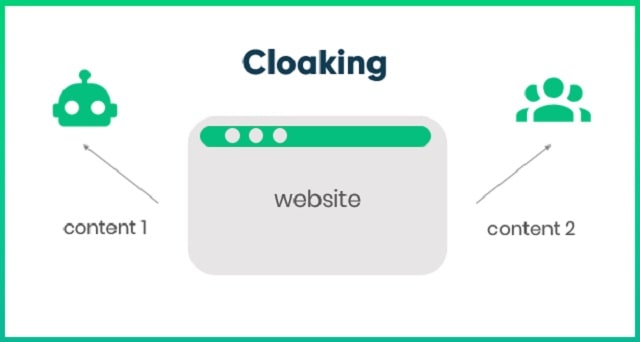
The technique for returning a different version of web content to users is called cloaking. This type of technique used to move a particular page up in the search engine rankings.  This unique SEO technique is used for showing alternate information to the users. In this technique, one version of a webpage is shown to the consumers, and another version is shown to the search engines. 

Cloaking is the technique that usually violates the search engine guidelines of Google. This is not a good practice for the long-term success of any business, at least if it is discovered by Google. 

Different Types Of Cloaking Techniques 

1. User-Agent Cloaking 

It is a type of cloaking that serves different versions of a particular website for different web browsers. It is done to provide a better overall user experience for different types of browsers. 

2. IP-Based Cloaking

It is a type of cloaking technique in which different versions of a particular website are served depending on the IP address of the target visitor. It is done to deliver different content to visitors from different types of locations. 

3. Javascript Cloaking

This cloaking technique presents various types of content which are based on the visitor's referrer. It is used for serving all kinds of other landing pages to visitors from various sources. 

4. Referrer Cloaking

Referrer cloaking involves examining the referring URL and displaying different content based on that information. For example, a website might show a landing page specifically tailored to visitors coming from a particular referral source, such as a social media platform or a specific website. 

5. Geo-Targeting Cloaking

Geo-targeting cloaking is a technique that serves different content based on the user's geographical location. This can be useful for displaying location-specific offers or information. For instance, an e-commerce website might show different prices or shipping options based on the user's location. 

Cloaking Conclusion

Cloaking is a controversial technique that can be used for both legitimate and deceptive purposes. While some marketers employ cloaking to enhance user experience and provide personalized content, others may use it to manipulate search engine rankings or deceive users. It is important to understand the different types of cloaking techniques to stay informed and make informed decisions in the online world. 

Remember, using cloaking techniques that violate search engine guidelines can lead to site penalties and a negative impact on your website's visibility. It is always recommended to focus on providing valuable and relevant content to both search engines and users. 

I hope this article helps you understand the concept of cloaking and its various techniques. If you have any further questions, feel free to ask by contacting us! You can learn more about web design, SEM, and search engine optimization in our SEO tab.

The Revolution Of Web Development Services

web development services revolution

Explaining what the Internet is like trying to explain what the world is. That is why it is a little easier to talk about web development and its services. Therefore, knowing about this topic is very important to discover how all the pages we visit every day are built and designed, along with the different mobile apps. 

Indeed, the job of the web developer is one of the most demanded within the labor context, due to the need that all companies have, regardless of their size, to make a place for themselves on the web and attract new potential clients. 

But what is all this about web development services and why is it so important? Web development includes the activities of creating websites based on the intranet or the Internet. Website design, web content development, client-server side scripting, and network security setup are all part of the web development process. 

There are different types of web developers out there, each of which focuses on a specific component of website development. To understand what a web developer is, you first need to know that there are three different types of web developers: front-end, back-end, and full-stack. 

Back-end developers deal with the code that regulates how a website loads and runs, while front-end developers deal with the parts of a website that visitors see and interact with. Full-stack developers work on a wide variety of projects. 

Now, you have to take into account a couple of tips to choose a web developer and ensure the good steps of your company. A good decision can save you time and money, whether you are looking for a creative website development organization that also offers SEO services and marketing automation services or a freelancer who works from home. 

Here are some other recommendations: 

- That It Be Someone Who Fits Your Needs - Learn how to identify creatives who can combine your skill set to help you achieve your specific goals when searching for your ideal developer. 

- Your Technical Skills - Since not all websites are built to do the same thing, any web developer who can build to a client's individual needs stands out from the crowd. 

- Experience - It is good to know what previous projects a web developer has worked on and what their former clients say about them to assess their level of experience. 

- Its Speed - If your website is attacked, i.e. hacked, or has a major flaw, your developer needs to be ready to respond quickly, because downtime equals lost revenue. 

Finally, it is important to reflect that since companies depend on everything that happens online, web development services have become a cornerstone of modern development. Therefore, it is not surprising that more and more companies are looking for specialists to help them create a more complete and fluid digital experience.

7 Ways To Fail When You Hire A Dedicated Development Team

how dedicated development team can fail software devs

If you plan to extend your engineering capacity but lack the local talents with the right combination of skills and expertise, you can hire dedicated software development team. This model offers many undeniable benefits for businesses willing to avoid the common issues related to hiring in-house. 

However, as with any engagement model out there, it is not universal for all projects. Business and startup clients need to understand this model's peculiarities before using it for a particular case. Let’s review the ways in which the dedicated team won’t work and overview the benchmarks for not picking the model. 

What Is A Dedicated Development Team? 

A dedicated team is a business model of cooperation between a service provider and a client. The latter hires a team of software developers and other specialists for their projects. Unlike in-house developers, dedicated teams can work in another country or region and don’t require administrative and legal oversight. 

When clients hire dedicated development teams, they can obtain exclusive resources focusing on the required tasks with little supervision. A service provider handles talent sourcing, recruiting, and onboarding and builds the entire team as per the project’s requirements. They take care of team retention, motivation, and each member’s professional development as well. 

The client can have full control over the deliverables and negotiate the desired reporting and communication routines. As a result, the decision to hire a dedicated development team breeds a transparent partnership between a service provider and a client where a team serves as a standalone unit with little dependence on an in-house staffing hierarchy. 

When A Dedicated Team Model Can Fail 

The dedicated team model won’t work out when you: 

1. Choose A Company Without Proper Research 

The essence of hiring a dedicated development team is entrusting an outside service provider with the task of finding specialists, assigning responsibilities, and making them work as a whole without disruptions. Before selecting such a model, you need to be sure that a chosen vendor can deliver on a promise and make everything possible to attain your business goals. However, if you don’t invest time in researching the options, it may lead to mistrust issues and affect the project’s progress. 

2. Outsource Core Functions 

Another vital benchmark for not choosing to hire a dedicated development team is when you lack specialists to support and develop your essential tasks. Delegating core functions to an outside vendor won’t do a favor to your competitive advantage. Instead, it is necessary to focus on your primary offering and assign third-party developers with non-essential tasks. 

3. Have No Clearly Stated Objectives 

It is easy to lose focus and motivation for remote and distributed teams when there is no alignment between the overall strategy and day-to-day workflow. If you fail to keep everyone on the dedicated team on track and guide them towards a common goal, it can quickly lose focus and erode with time. 

4. Have No Adherence To The Agile Methodology 

Agile teams can deliver long-term projects with evolving requirements by developing high-priority features step by step. The dedicated team model works when there is flexibility in a constantly changing environment and room for regular feedback from real-life users. 

5. Set Unrealistic Deadlines Or Have Short-Term And Simple Projects 

Another point is defining the type of the project and its duration. The ultimate goal of the dedicated team model is to cater to long-term and large projects that require a constant need for quality outcomes. In other cases, it is better to use other engagement models or hire freelancers. 

6. Face Communication Or Cultural Hurdles 

In a remote-first setup, dedicated developers rely on organized communication using online tools. Additionally, the hired team can work in faraway locations and have different work styles, language peculiarities, and business practices. Failure to set proper communication patterns can lead to ongoing misunderstanding and alienation of certain individuals. 

7. Have A Lack Of Motivation And Support 

Dedicated specialists are strong team members that can stay productive and laser-focused on your tasks despite working on another continent. However, internal specialists may start to feel superior to outside developers. Dedicated developers can lose motivation to work with your in-house team when treated as outsiders. 

Final Word On Dedicated Development Teams

The practice shows that it is essential to know how to hire software developers. But it is even more critical to choose the most suitable engagement model. You need to be sure a dedicated development team model is right for the project and use the benchmarks above to finalize your decision.

Spammy Website Features That Could Cause Your Website To Slow Down

spammy website features causing website slow down lower site speed

If you are wondering why your website is running slow, then you are not alone. Having a slow running website can be frustrating for both you and your website visitors. In fact, websites that load slowly are responsible for over two billion dollars of lost revenue worldwide each year. 

Keep reading to find out more about 4 common reasons why your website runs slowly, and some solutions that you can put in place to see better results. 

1. Un-Optimised Images 

Images that are considered to be un-optimised have a large file size, undescriptive file names and no alt tags, and can make your website load slower. For example, if you’ve worked hard to edit detailed and interesting images for your website using Photoshop, these are often saved as large files and all that detail might be detrimental to the site loading time no matter how nice they look. Along with this, since Google doesn’t actually see images but instead reads alt tags, Google does not know what your images are if you do not add a short description. The good news is that you can find lots of solutions including tools that you can use to compress your images before uploading them. 

2. Lots Of Elements 

The average webpage size was 2MB in 2015, and this has only increased over time as we enter the second half of 2022. The size of your page is affected by code, scripts, videos, stylesheets, images, and any other elements that you might have on your page. CSS is a popular language to use for websites and web pages these days, but poorly optimised CSS elements can slow your website down. If you are having trouble, a good web design agency can help you determine where you can afford to lose elements to make your pages smaller and therefore easier to load. 

3. High Website Traffic 

A lot of website traffic, for example from click-bait, can also be another reason why your website might be loading slowly. Although information does move very quickly, a typical website is only able to accommodate a certain number of visitors before it will begin to slow down. This number of visitors is determined by the site’s bandwidth. This refers to how much information a connection can handle in a given amount of time. More bandwidth means that information can be delivered faster, and more visitors can be accommodated for. 

4. Too Many Ads 

Ads can be a good way to make some extra money from your website, but they do take up space on the site in the same way as other types of content such as videos and images. Because of this, too many ads can cause your website to be slow-loading so it’s important to be careful if you are allowing third parties to advertise on your website. Not only can too many ads increase the loading time, but they can also annoy your viewers and cause further issues. 

Conclusion

Slow loading time is one of the biggest killers of website success. It damages your site SEO and hurts user experience, increasing the chances of visitors going to the competition instead. If your website is loading slowly, it’s important to figure out the root issue and find the best solution.

Understanding The Oracle NetSuite EcoSystem

oracle netsuite ecosystem

If you have recently implemented NetSuite or are now getting to the point where you realize you could use additional support to make the ERP work more effectively for your business, it can be useful to understand the different types of NetSuite professionals in order to identify the right person to either hire permanently or on a contract basis. 

What Is A NetSuite Developer And Consultant? 

A NetSuite developer and NetSuite consultant is specialized professional that works inside of the Oracle NetSuite ERP software solution. They will have experience with multiple companies optimizing and automating business processes. 

NetSuite Developer 

When working in your NetSuite environment, you’ll want to take a look at customization since it can allow the software to form around your business rather than the other way around. NetSuite developers write SuiteScript to help automate processes that workflows can’t accomplish. Functional NetSuite consultants can help build out other configuration pieces or workflows for you so that you only need to worry about your role entering specific data. 

Let’s dive into what makes a good NetSuite developer… 

There are quite a few factors to review prior in order to set the foundation. Skills specific to NetSuite need to be identified and there are some softer skillsets that support the NetSuite specific developer skillsets. Both developers and consultants interact frequently together and have a good understanding of what the other does. 

Here are some skills of a good NetSuite developer 

1. Know SuiteScript in and out (Suite Script developer) 

    a. User event Scripts 
    b. Scheduled Scripts 
    c. Client Script 
    d. Suitelet 
    e. Map-Reduced Script 

2. Should know JavaScript well 

3. Ability to make NetSuite integrations via SOAP or Restlet.

4. Make custom Advanced PDF and Email Templates using Freemarker, HTML, and CSS 

A big bonus to a NetSuite developer is if they are also a SuiteCommerce Advanced developer. This skillset is typically a niche skill that some know more of SCA rather than NetSuite. However, SCA developers still need to know NetSuite development. The different is advanced knowledge in HTML, CSS, SCA architecture of single page applications (SPA), web development, search engine optimization (SEO), and JavaScript. 

NetSuite Consultant 

A NetSuite consultant is classified as someone who knows more about business processes and how to configure all the NetSuite modules to make it work properly. The NetSuite consultant typically stays focused on helping clients identify ways to solve their pain points using native NetSuite processes. They might also work directly with a NetSuite developer to implement custom solutions that can’t be done using the user interface. These consultants are often called functional consultants. If they also know some scripting as well, they might be called a NetSuite techno functional consultant. Techno Functional Consultant that have a good understanding of solution designing and business process often become a NetSuite architect. These solution architects understand the ins and outs of NetSuite to be able to take any business problem and build a unique solution that solves it. 

A functional consultant should know these skills at a minimum 

1. Workflows 

2. A good portion of NetSuite modules 
   a. CRM 
   b. Advanced Financials 
   c. WMS 
   d. OneWorld 

3. Know how to configure all standard native features including building custom fields 

4. Be able to quickly identify business issues and propose potential solutions 

5. Have a solid awareness of 3rd party software that integrates into NetSuite 

SuiteCommerce And SuiteCommerce Advanced (SCA): 

NetSuite has its own ecommerce platform called SuiteCommerce Advanced. SuiteCommerce developers to help implement the solution and make it easier to have a custom website that works perfectly for your business. You’ll want to check out commerce agency partners that have been authorized by NetSuite or you will lose a lot of money with mistakes. 

You can also see how it compares to Shopify Plus or other common ecommerce platforms such as Magento. As you begin the purchasing process, the first step will be to choose NetSuite SuiteCommerce theme. Then you can get the implementation started. There are many places to shop around for pre-built SuiteCommerce customizations or apps. 

But the two primary locations are SuiteMarkets or SuiteApp. Suite Markets is a 3rd party platform that hosts all types of solutions and Suite App is built by NetSuite and has quality control measures in place. Both options will help you optimize your ecommerce solution. Both options are very good places to find both NetSuite apps and SuiteCommerce apps. Getting a pre made NetSuite ERP customization or Suite Commerce customization can be difficult to find, but Suite Markets will likely be the best place to find less common customizations.

The Lean Startup Life Media Network Newest Blog Posts: